Software updates, why you should never put them off
Listen to the audio version
An update notification almost always shows up at the worst possible time, right in the middle of something else, and "Remind me later" becomes the most natural reflex in the world. Yet it's one of the most effective security habits there is, for a specific reason few people really know.
What a security update actually fixes
A security flaw in software generally exists long before it's discovered. As long as it stays unknown to the vendor, it's only a danger to the rare people capable of finding it themselves, a long and costly effort that sharply limits how many attackers are even a threat. The moment the vendor publishes a fix, everything changes: the security advisory that almost always comes with that fix explains, at least in broad strokes, which flaw was fixed and sometimes how it works. That flaw, until then hard to find, suddenly becomes publicly documented.
From that point on, exploiting the flaw no longer requires discovering it yourself, only targeting whoever hasn't installed the fix yet. This is exactly the mechanism that lets a worm spread on its own across a large number of machines (see the article on malware): all it takes is a patched flaw staying unapplied on enough devices for an automated attack to exploit it at scale, with no need to target anyone in particular.
The zero-day, the flaw nobody can fix yet
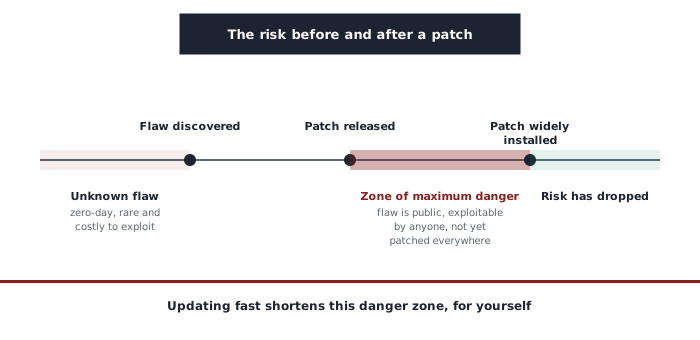
A flaw still unknown to the vendor, and for which no fix therefore exists, is called a zero-day (literally "day zero," since the vendor had zero days to react before it was exploited). These flaws hold real value in certain markets, precisely because they only work until they're discovered: once found and fixed, their usefulness collapses instantly for the attacker who held them. It's this scarcity and short lifespan that explain why a zero-day tends to be reserved for high-value targets (large companies, governments), rather than used at random against just anyone.
Why so many hacks exploit already-patched flaws
A good share of the attacks that succeed in the real world don't exploit a sophisticated zero-day, but a flaw that's already known and already fixed for a long time, simply because a significant number of devices worldwide stay behind on their updates, sometimes by months or years. For an attacker, targeting an already publicly documented flaw costs far less than finding a new one themselves: all it takes is scanning the internet for devices that still respond like an unpatched version. This is an important difference from the image usually attached to hacking, often imagined as some unprecedented technical feat, when the overwhelming majority of real cases look more like taking advantage of a door left open after everyone already knows it should be closed.
Automatic updates, why you should let them run
Leaving a security update pending, even for a few days, extends by that much the window during which a device stays exposed to a now-public flaw. Automatic updates exist precisely to remove that delay from human decision-making, which is systematically slower and more prone to procrastination than a system programmed to act on its own.
The most common hesitation around automatic updates remains the fear of a failed update breaking something that used to work, a fear that isn't entirely unfounded: it happens, rarely, but it happens. This is why most major vendors roll out their updates gradually rather than to everyone at once, which lets them catch a problem on a small group of devices before it reaches everyone. The real risk from a delayed security update remains, in the overwhelming majority of cases, far greater than the rarer risk of a bug introduced by the update itself.
The special case of end-of-life hardware
A device or operating system that has reached end of life no longer receives any security fixes at all, no matter how often its owner manually checks for available updates. Any new flaw discovered after that date will, by definition, never be fixed on that particular device, since the vendor has officially stopped devoting resources to it. This is a genuinely growing risk: an old Android phone still in use years after release, a version of Windows whose support has ended, or a router never replaced since it was installed, all quietly accumulate known, permanently unpatched flaws. In this specific case, "checking for updates" is no longer enough: only upgrading to a still-supported version, or replacing the device, actually closes off that exposure.
What to update, not just your computer
- Each device's operating system (phone, computer, tablet)
- The web browser, often the most exposed entry point since it constantly handles content coming from the internet
- Individually installed software and apps, not just the system
- The home router or internet box's firmware (see the article on Wi-Fi), often forgotten because it never actively nags for an update the way a computer does
- Connected home devices, which rarely receive fixes after the first few months following release
- Browser extensions, which often have broad access to the content of the pages you visit
Good habits to keep
- Turn on automatic updates wherever possible, rather than relying on regularly checking manually
- Never indefinitely put off an update explicitly flagged as security-related, even in the middle of something important
- Restart the device when the update asks for it: many fixes only truly take effect after a restart, a detail often overlooked that leaves the flaw active despite the download already being complete
- Check every so often whether an older device has reached its official end of support, especially a phone or router never replaced in several years
A security update is never really optional, even when nothing seems wrong without it. The danger it fixes isn't hypothetical: the moment it's published, it becomes documented and actively searched for by attackers who now just have to find who hasn't installed it yet.