How Bluetooth actually works
Listen to the audio version
Bluetooth links earbuds, a smartwatch, or a game controller to a phone several times a day, without anyone ever really wondering how it works, or why the connection drops the moment you wander a few too many meters away.
The basic principle: a direct link between two devices
Bluetooth uses radio waves, on a frequency band close to Wi-Fi's (see the dedicated article), but with a very different purpose. Wi-Fi connects a device to a router to reach the internet; Bluetooth connects two devices directly to each other, with no intermediary and no network in between. This difference explains why Bluetooth earbuds work perfectly well somewhere with no Wi-Fi or mobile network available at all: the music comes straight from the phone, not the internet.
Bluetooth was also designed from the start to use very little power, an essential requirement for objects as small as earbuds, which have no room for a large battery. It's this low power draw, more than transfer speed, that made it so successful on wearable connected devices.
Pairing, the handshake that secures the connection
Before two Bluetooth devices can talk to each other, they need to pair, a step that normally only happens once per pair of devices. During pairing, the two devices exchange a security key, sometimes confirmed by a PIN code shown on one of the two screens, which then encrypts every future communication between just the two of them. Once this step is done, the two devices recognize each other automatically whenever they're within range, without needing to repeat the process.
This is what explains why earbuds already paired with a phone reconnect on their own as soon as they come out of their case, while a device that has never been paired before always has to go through this step before exchanging anything at all.
Range classes, and why it isn't just about distance
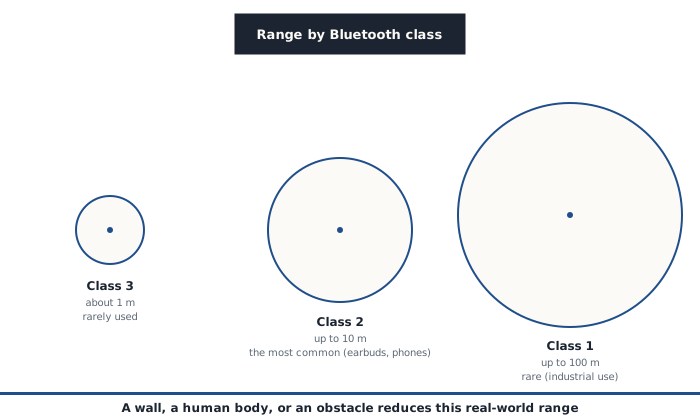
The Bluetooth standard actually defines three power classes, with very different theoretical ranges. Class 3, the weakest, barely reaches one meter and is rarely used in practice. Class 2, by far the most common, covers around ten meters, which matches exactly what the vast majority of consumer earbuds, smartwatches, and game controllers use. Class 1, more powerful and more power-hungry, can reach around a hundred meters, but stays reserved for more specific uses, like certain industrial or professional audio equipment.
In practice, the real range is almost always shorter than these theoretical figures. A wall, and even more so a human body (the body is particularly good at absorbing the frequencies Bluetooth uses), can noticeably cut the effective range. That's why keeping a phone in a back pocket, with the body between the phone and the earbuds, can be enough to cause small dropouts that the same distance, without an obstacle, wouldn't have caused.
Bluetooth Low Energy, the variant built for connected devices
A more recent variant, Bluetooth Low Energy (BLE, sometimes called Bluetooth Smart), was designed specifically for objects that need to last months, even years, on a single battery, like a temperature sensor or an activity tracker. Unlike classic Bluetooth, which keeps a permanent connection going throughout use (essential for a continuous audio stream, which can't tolerate the slightest interruption), BLE sends short bursts of data at regular intervals and then drops into deep sleep between each one. This difference in behavior, invisible to the user, explains the considerable gap in battery life between two seemingly similar Bluetooth devices.
Security risks specific to Bluetooth
Bluetooth entirely bypasses the firewall (see the dedicated article), since it isn't a network connection based on an IP address: a firewall simply doesn't see this kind of traffic go by. A few risks specific to this technology are worth knowing:
- Bluejacking means sending an unsolicited message or file to a nearby, publicly discoverable Bluetooth device. It's more of a nuisance than a real danger, but accepting a file sent this way by a stranger remains a bad idea, for the same reasons opening an unknown email attachment is (see the article on malware)
- Bluesnarfing is considerably more serious: it exploits a security flaw to directly access data on a device (contacts, messages) without even needing the victim to accept a pairing request. This kind of flaw mostly affects older devices whose software has never been updated
- Broader flaws, like the ones grouped under the name BlueBorne discovered in 2017, showed it was possible, on unpatched devices, to take remote control with no action at all from the victim, not even accepting a pairing request, just because Bluetooth was turned on and discoverable
What these risks have in common is the same as with a lot of software flaws: they almost exclusively affect devices whose system hasn't received security updates that have been available for a long time.
Good habits to keep
- Keep Bluetooth turned off when it's not in use, rather than leaving it on and permanently discoverable by every nearby device
- Refuse any pairing request or file sent by an unknown device, exactly as you would a suspicious link or attachment
- Remove devices from the paired list once they haven't been used in a long time
- Keep your devices' systems up to date, the most effective protection against already-patched Bluetooth flaws like BlueBorne
Bluetooth remains, overall, a safe technology for normal everyday use: earbuds, a watch, a controller. The real risks almost always involve a device left without an update for a long time, more than Bluetooth itself.