Virus, worm, trojan, ransomware: the types of malware explained
Listen to the audio version
In everyday language, "virus" gets used to mean almost any malicious software. In reality, each family behaves differently, spreads differently, and isn't fought in exactly the same way. Knowing these differences helps make sense of what a security alert or a news article is actually saying.
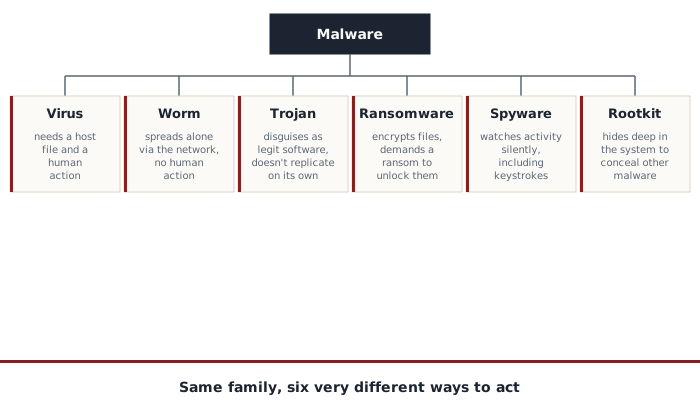
Virus and worm: two different ways of spreading on their own
A virus is a program that attaches itself to an existing file or piece of software, a bit like a real virus needs a host cell. It stays dormant until that file is opened or run by someone. It's that human action, opening the infected file, that triggers its spread to other files on the machine, and potentially to other machines if the file gets shared.
A worm works differently, even though the word is often confused with virus. A worm needs no host file and no human action to spread: it directly exploits a security flaw in software or a system to copy itself from one machine to another across a network, entirely on its own. This is what makes worms particularly dangerous at scale: a single vulnerable, connected machine is enough, with no user needing to click on anything at all.
The trojan, the malware that lies about its own nature
A trojan presents itself as legitimate, useful software, often a free pirated game, a photo-editing tool, or a fake update, to convince the victim to install it themselves. Unlike a virus or a worm, it doesn't replicate on its own: its entire strategy relies on that initial deception, not on automatic spreading. Once installed, it can open remote access to the machine, steal data, or serve as an entry point for installing other malware afterward.
It's one of the most common delivery methods for phishing by attachment (see the article on phishing): an attached file presented as an invoice or an urgent document is actually a trojan, and opening it amounts to installing it yourself, in full confidence.
Ransomware, today's costliest threat
Ransomware encrypts the victim's files, making them unreadable, then demands a ransom payment in exchange for the decryption key. It's one of the most profitable threats today for attackers, against individuals and entire companies alike.
A more recent development, called double extortion, adds a second layer of pressure: before even encrypting the files, the attacker copies some of them, and threatens to publish them publicly if the ransom isn't paid, on top of keeping them encrypted. This tactic gets around an otherwise effective defense against encryption alone: having a recent backup no longer protects against the leak threat, only against losing the files. Paying the ransom, for that matter, guarantees neither getting the files back nor that the stolen data won't be published anyway. The best protection remains a regular backup, kept offline, combined with being careful about what gets opened and run.
Spyware and keyloggers, the silent threats
Spyware watches a user's activity without drawing attention: browsing history, habits, sometimes access to the camera or microphone. The data collected is then resold or used for other attacks.
A keylogger is a specific form of spyware, dedicated to recording every keystroke, including passwords typed in full confidence on an otherwise legitimate site. It's one of the rare methods capable of getting around an otherwise strong, never-reused password (see the article on passwords): it doesn't matter how good a password is if the act of typing it is being recorded live.
The rootkit, the threat hiding inside the system
A rootkit steals nothing and spies on nothing by itself: its sole job is to hide the presence of another piece of malware, or of unauthorized access, by embedding itself very deep inside the operating system. It can, for example, hide a malicious file or process from a regular antivirus, by intercepting the information the system would normally report reliably.
This is what makes a rootkit particularly hard to detect and remove: the usual cleanup tools rely on information the rootkit itself has falsified. In the most serious cases, a complete system reinstall remains the only truly reliable fix.
How these programs actually get installed
- A booby-trapped email attachment, often presented as an invoice or an urgent document
- Software downloaded from outside official sources, especially pirated or "cracked" versions
- An infected USB drive plugged into the machine
- An unpatched flaw in a system or piece of software left without an update, the typical entry point for a worm
- A fake ad that triggers an automatic download
How to protect yourself without being an expert
- Keep your operating system and software up to date, especially to guard against worms that exploit known flaws for which a fix is already available
- Only download from official sources, never a pirated version of paid software
- Keep an antivirus active: the one built into Windows or macOS by default is enough in the vast majority of cases
- Make regular backups, ideally offline, the most reliable protection against ransomware
- Be wary of any free software promising a feature that's normally paid for elsewhere
None of these families require being an expert to protect against properly. Most infections come down to a handful of simple habits worth fixing, not some impossible-to-anticipate flaw.