Why your password probably isn't protecting you
Listen to the audio version
If your password is a first name followed by a year, or a string like "azerty1234," this article is speaking directly to you. And even if it isn't, it's still worth reading: most people think they're doing the right thing, and are wrong about what actually matters.
The real danger isn't someone guessing your password
We tend to picture a person sitting at a screen, trying "first name + birth year," then "first name + 123," and so on until they land on the right combination. That's almost never how it actually happens.
Two scenarios come up far more often:
- A site where you have an account gets breached, and the entire database (emails and passwords) ends up in circulation. This is called a data breach. These databases sometimes end up for sale on specialized forums, sometimes simply published for free a few months later.
- An automated program tests billions of combinations per second against an account, never getting tired, never sleeping, and never discouraged after the thousandth failure. This is called a brute-force attack.
In both cases, it isn't your wits against those of an attacker sitting behind a keyboard. It's your password against a machine, or against a database already stolen somewhere else, on a site you might not even remember signing up for.
Not all breaches are equal, either. A serious site never stores your password as-is: it runs it through a mathematical operation called hashing, which turns it into an unreadable string, different every time and impossible to reverse directly. If a site that correctly applies this practice is breached, an attacker recovers this hashed version, not your actual password, and still has to guess it by testing combinations until they get the same hashed result. This is exactly why a long password slows this work down enormously, even once the database is in the wrong hands. Conversely, a site that still stores passwords in plain text (a practice now considered deeply negligent) directly exposes your actual password the moment there's any breach at all. This is often spelled out in a company's official statement after an incident: the phrase "passwords were hashed" concretely changes the real level of risk to you, unlike "passwords were exposed."
Why "password123" doesn't help at all
The most commonly used passwords in the world are known, published, ranked, and updated every year by security researchers who analyze data breaches. A program that automatically tries this list of common passwords cracks that kind of account in seconds, not years.
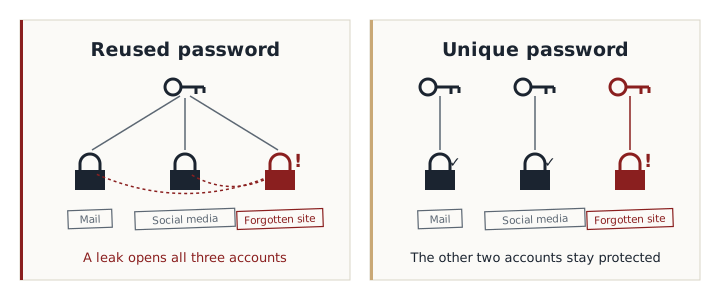
There's an even more common problem than a weak password, though: reusing the same password across multiple sites. Take a concrete example. You create an account in 2020 on an online shopping site for a single order, with the password "Chocolate2020", the same one you use for your email and your Instagram account. Five years later, that small site you forgot about long ago gets breached. You'll probably never know, since you don't go back there anymore. But the database is now circulating with your email address and that password. An attacker only has to try it on your inbox: it's actually three of your accounts that fall, not just one, and it all starts from a site you weren't even thinking about anymore.
This is the most common domino effect in security, illustrated below: a single shared password turns the breach of a minor site into the compromise of accounts that actually matter.
The habits that feel safe but aren't
Some habits give the impression of safety while changing almost nothing against a real attack.
Swapping letters for numbers that resemble them, like writing "P@ssw0rd" instead of "Password," is one of them. This trick is so widespread that the lists attackers use account for it systematically: a program that tries "password" also automatically tries "p@ssw0rd," "p4ssw0rd," and every obvious variant of that kind, in barely a few extra milliseconds.
Slightly varying the same password from one site to another creates a similar problem. Using "Chocolate2024" on one site and "Chocolate2025" on another gives the impression of having different passwords, but a person who discovers one guesses the other in seconds. The one-password-per-site principle only works if the passwords are genuinely unrelated to each other, not just visually different.
Changing your password regularly without a specific reason, a practice long recommended by default, has also shown its limits: forced to change it every three months, most people simply increment a digit at the end ("Chocolate1," "Chocolate2"...), which adds no real security. A strong password that doesn't change often beats ten predictable variants of the same password changed out of obligation.
What actually makes a password strong
Contrary to popular belief, it isn't complexity that matters most, it's length. A long password that's easy to remember, like a four-word phrase with no relationship between the words, is often stronger against a brute-force attack than a short password stuffed with symbols nobody can memorize. That short, complex password even has a hidden flaw: being so hard to remember, people end up writing it down somewhere, on a sticky note or in a text file, which completely cancels out the point of the complexity in the first place.
A simple method for building a strong passphrase: pick four common words, unrelated to each other, in an order that makes no logical sense, and string them together as-is. "Lamp37Duck!Car" stays easier to remember than "Xk9#mQ2vL" for most people, while being statistically much harder to crack by brute force, simply because it's longer and the combination of unrelated words doesn't match any predictable pattern.
A few concrete guidelines for building a good password:
- Aim for at least 12 to 16 characters: a phrase rather than a single word
- Choose words with no logical link between them, not a string tied to your personal life
- A different password for every important site, especially your email, which is often used to reset all the others
- No guessable personal information: first name, birth date, pet's name, anything findable in two minutes on a social network
- Turn on two-factor authentication wherever a site offers it: an extra code, sent to your phone or generated by an app, that blocks access even if the password has leaked
Managing a different password for every site
This is the point where most people give up, and understandably so. Nobody can hold fifty unique, genuinely strong passwords in their head, especially on top of everything else a day already demands.
The solution is called a password manager. It's an application that generates and remembers a unique, complicated password for every site, protected by a single master password that only you know. In practice, instead of remembering fifty poorly chosen passwords because they need to stay memorable, you remember exactly one, properly built, and the rest becomes invisible day to day: the manager fills in the fields for you.
One concern comes up often at this point, and it's a fair one: doesn't handing all your passwords to a single application mean putting all your eggs in one basket? The answer lies in how serious applications like this are built. The principle is called end-to-end encryption, or "zero-knowledge" architecture: your passwords are encrypted directly on your device, with a key derived from your master password, before they're even sent to the manager's servers. The company itself never knows your master password and technically cannot read the contents of your vault, even if its own servers were breached. That's very different from a site storing your passwords in plain text: here, whatever might leak is already unusable without the key that only you hold.
Most modern browsers and operating systems now come with their own basic built-in password manager, good enough to get started. A dedicated application, separate from the browser, generally offers more features (secure sharing, breach alerts, availability across every device regardless of which browser you use), but the core idea stays the same: one thing to remember correctly, instead of fifty poorly chosen ones.
In short: a password doesn't need to be unbreakable by a human sitting across from you. Above all, it needs to never be reused elsewhere, even in a slightly modified form, and to be long enough to discourage a machine that, unlike a person, never gets tired. Everything else (mandatory symbols, forced changes every three months) matters far less than most sites would have you believe.