Passkeys, the password-free login that resists phishing
Listen to the audio version
The article on two-factor authentication briefly mentioned passkeys as one of the few methods genuinely resistant to phishing. They deserve more than a mention: a passkey isn't added on top of a password, it replaces it entirely, working in a way that removes at once several of the weaknesses described in the article on passwords.
The underlying problem with passwords
A password is a shared secret: the user knows it, and the site keeps a record of it to be able to check it. That sharing creates two weaknesses no complexity rule can fix. First, the secret can be typed in the wrong place: on a fake phishing site, the password goes out exactly the same way it would on the real one. Second, the site itself can have its database stolen, and with it the means to recover, or at least test, every user's password (see the article on databases).
What a passkey actually is
A passkey relies on the asymmetric encryption already described in the dedicated article. When it's created, the device generates a key pair specific to that exact site: the public key is sent to the site, which keeps it; the private key stays on the device, or in the manager that stores it, and never leaves.
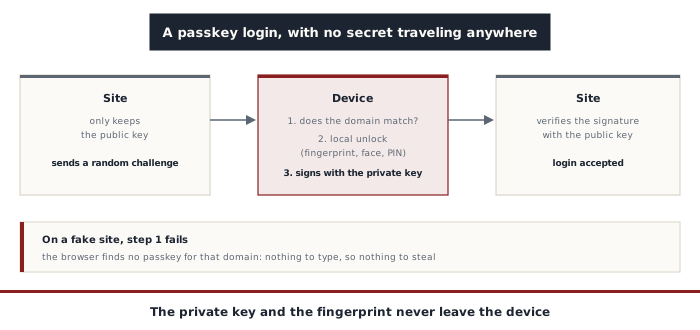
At every login, the site sends a challenge, a random string that's different every time. The device asks the user to unlock it (fingerprint, face recognition, or PIN), then signs that challenge with the private key. The site checks the signature against the public key it kept, and accepts the login if it matches. No secret travels over the network: only a signature valid for that single challenge, useless a second time.
An often misunderstood point: the fingerprint or face is never sent to the site. It only serves to unlock the private key on the device itself, exactly like a phone's passcode. The site receives nothing biometric, only the signature.
Why a fake site can't do anything with it
Each passkey is tied to the exact domain name of the site it was created for, and it's the browser, not the user, that checks that domain before offering the passkey. On a fake site with an almost identical address, even one protected by a perfectly valid HTTPS padlock (see the article on the HTTPS padlock), the browser simply finds no matching passkey. There's nothing to type, so nothing to steal, and the user's vigilance doesn't even come into play anymore.
A leak of a site's database also loses most of its value: it only contains public keys, which can verify a signature but not produce one. An attacker who gets hold of them can't use them to log in anywhere.
Synced or tied to a device
Two broad families of passkeys coexist. Synced passkeys are stored in a manager (Apple's, Google's, or an independent one like Bitwarden) and available on every device signed into the same account: losing a phone doesn't mean losing its passkeys. Device-bound passkeys live only on a physical security key and can't be extracted from it: sturdier, but lost along with the key itself if no backup key was registered.
To log in on a computer that doesn't hold the passkey, the browser shows a QR code to scan with the phone. The phone then checks over Bluetooth (see the article on Bluetooth) that it's physically close to the computer, which stops a remote attacker from getting a victim to scan the attacker's own QR code.
Where they remain vulnerable
A passkey protects the login itself, not everything around it:
- If the site still keeps a password or SMS recovery on the side, the attacker will simply target that door left open
- The process of adding or recovering a passkey can be hijacked through social engineering (see the dedicated article): in September 2026, Microsoft described a campaign in which fake support technicians called employees to push them to "update" their passkey or two-factor authentication, so the attackers could add their own sign-in methods
- Once logged in, the open session can still be stolen by malware installed on the device, since the passkey only comes into play at the moment of logging in
- Switching ecosystems (moving from Apple to Android, for example) is sometimes less simple than exporting a list of passwords
Passkeys don't make an account invulnerable, but they shift the attack: instead of stealing a secret that gets typed, the attacker now has to convince someone to open a different door themselves. That's a noticeably higher bar, and the reason it's worth accepting the offer the next time a site makes it, turning off the old password behind it where possible.