The HTTPS padlock: what it actually guarantees, and what it doesn't
Listen to the audio version
The padlock shown to the left of a web address has become, over time, an almost instinctive trust reflex: present, the site feels safe; absent, something feels off. That reflex rests on a fairly widespread misunderstanding of what this small symbol actually proves, and what it doesn't prove at all.
What the padlock actually guarantees
The padlock signals that an HTTPS connection has been established between the browser and the server, meaning the traffic exchanged is encrypted (see the article on symmetric and asymmetric encryption for the exact mechanism). Concretely, as soon as an address starts with `https://`, the browser and server first negotiate a temporary encryption key using asymmetric encryption, then switch to faster symmetric encryption for the rest of the visit. This negotiation is called the TLS handshake.
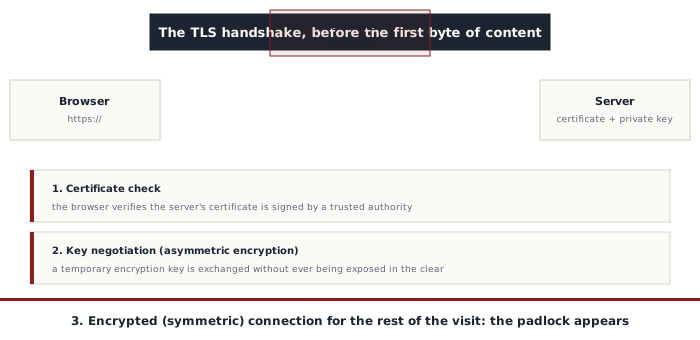
What the padlock guarantees, precisely, comes down to two points: the connection is encrypted, so nobody on the path between the browser and the server (a public Wi-Fi network, an internet provider, a compromised router) can read the exchanged content in the clear; and the server responding genuinely holds the private key matching the certificate presented, proving it's the same server from one visit to the next, without impersonation happening along the way.
The certificate, and who decides to issue it
The padlock depends on a digital certificate, issued by a certificate authority (CA), an organization whose role is to verify one specific piece of information before signing that certificate. In the overwhelming majority of cases today, that check is called domain validation (DV): the authority only verifies that whoever requests the certificate genuinely controls the domain name in question, for example by having them place a specific file on that domain or edit a DNS record.
That check only covers the domain, never the identity or intentions of whoever purchased it. Since the arrival of free, automated authorities like Let's Encrypt, obtaining a valid certificate for any domain name one controls takes a few seconds, with no human review at all. A certificate used to exist to go further, extended validation (EV), which genuinely verified a company's legal identity and displayed its name in green in the address bar; most browsers have dropped that separate display in recent years, judged too poorly understood by users to justify the difference in trust it implied.
What the padlock absolutely does not guarantee
This is the most widely misunderstood point: the padlock says strictly nothing about the legitimacy, honesty, or intentions of the site displayed. A phishing site can obtain a perfectly valid HTTPS certificate for its own domain name, display the exact same padlock as a bank, encrypt the connection flawlessly, and still actively steal the credentials typed into it (see the article on phishing). Encryption only protects the path between the browser and the server; it protects nothing against a malicious server that receives the data in the clear once it arrives, since it's precisely that server which decrypts it at the other end.
This confusion has a concrete history: in the early 2010s, the near-total absence of HTTPS made the padlock a genuinely useful signal, since most malicious sites didn't bother setting it up. Since certificates became free and widespread, that correlation has disappeared: repeated studies of active phishing campaigns show that a large majority of fake banking sites or fake login pages now display a perfectly valid padlock.
What still stays a genuinely good habit
- Checking the exact domain name shown in the address bar, not just the presence of the padlock
- Remembering that the padlock confirms encryption, not a verified identity or good intentions
- Staying alert to a domain that resembles the expected one without being identical (a swapped letter, an added word, a different extension)
- Checking how the page was reached: a link received by email or text message deserves more suspicion than an address typed in directly or an already-saved bookmark
The padlock keeps playing a real and useful role, protecting a connection against interception in transit. It was never designed, however, and still isn't, to judge the trustworthiness of the site it belongs to.