What is DNS, and how does your browser find an IP address from a name
Listen to the audio version
The article on IP addresses explained that a computer never communicates with a domain name, only with an IP address. Nobody, however, types a string of digits to visit a site. That gap between what a human types and what a machine understands is bridged by a system called DNS (Domain Name System), one of the most heavily used mechanisms on the entire internet, and yet largely invisible.
The principle: a directory, spread across the whole planet
DNS works like a giant phone directory, matching a human-readable name to the real IP address of the corresponding server. The essential difference from an actual directory lies in its organization: rather than a single, centralized database, which would instantly become a critical point of failure for the entire internet, DNS is spread across millions of servers worldwide, organized in a hierarchy.
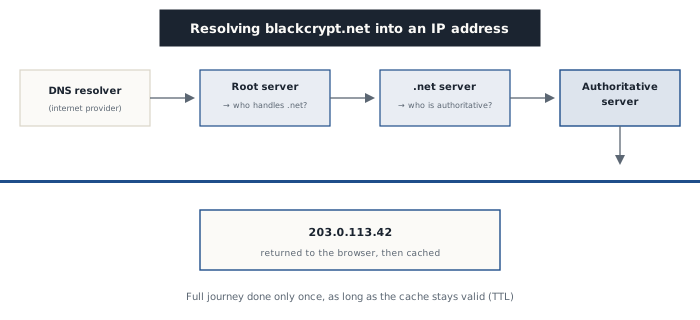
When a browser needs to resolve a domain name, the request first goes to a DNS resolver, usually provided automatically by the internet service provider or configured manually (public resolvers like Cloudflare's or Google's also exist, for speed or privacy reasons). That resolver then queries, in order, a root server (which only knows which servers manage each extension, like .com or .net), then the server responsible for that specific extension (which only knows which server is authoritative for the exact domain requested), and finally that authoritative server, which holds the actual IP address being sought.
Why it feels instant despite all that travel
This multi-step journey might seem slow, especially repeated for every site visited, but a caching mechanism makes it practically invisible. Every DNS response comes with a lifespan (TTL, Time To Live), indicating how long the resolver can reuse that response without going back to query the whole chain. The vast majority of daily DNS requests are therefore served directly from a cache, whether the internet provider's resolver's, the operating system's, or even the browser's own, without ever needing to redo the full journey.
That's why a change of IP address for a site (a server move, for example) sometimes takes several hours to propagate everywhere in the world: the time it takes for TTLs already cached all over to expire, before each resolver goes to look up the new answer.
What DNS never checks
DNS faithfully answers the question asked, never judging its legitimacy. A domain name deliberately made to resemble another, with a changed letter or a different extension, gets its own perfectly functional DNS resolution, exactly like the original site. DNS checks neither the identity of the target domain's owner nor the intentions of the site it points to: it strictly translates a name into an address, a role never designed to filter anything (see the article on phishing for what this kind of deceptive domain name actually tries to exploit).
A mandatory stop, and therefore a target
Because DNS resolution literally precedes every connection to a site, it remains a sensitive checkpoint for security and privacy. Historically, most DNS requests travel unencrypted over the network, which lets anyone along the path, including the internet provider itself, know precisely which sites a device is about to visit, even over an otherwise well-encrypted HTTPS connection. More recent protocols like DNS over HTTPS (DoH) or DNS over TLS (DoT) now encrypt these requests, a protection distinct from what a VPN provides (see the dedicated article), which encrypts all traffic rather than just name resolution.
DNS also remains a direct technical target: DNS cache poisoning seeks to inject a false response into a resolver, to quietly redirect a legitimate site's visitors to a server controlled by an attacker, without anything in the typed address ever changing for the victim.
Where it shows up concretely
- Every address typed into a browser potentially triggers a DNS resolution before the page even starts loading
- DNS caching explains why a server change takes time to propagate everywhere
- A deceptive domain name resolves just as well as a legitimate one, DNS never filters anything
- Encrypting DNS requests (DoH, DoT) protects browsing privacy, independently of the content's own encryption
DNS remains one of the oldest and most fundamental building blocks of the internet, predating the web itself by a good margin: without this constant translation between names and addresses, every site would only be reachable by a string of digits memorized by heart.