Firewalls, what they're for and how they filter traffic
Listen to the audio version
The firewall is one of the oldest tools in computer security, present on practically every device and every home router, often with nobody really paying it any attention. Here's what it actually does, and where its protection stops.
What a firewall actually does
A firewall examines every network connection coming into or out of a device, and decides whether to let it through or block it, based on a set of rules defined in advance. Each connection is identified by several pieces of information: the source and destination IP address (see the article on IP addresses), the port used (a number identifying the type of service, like port 443 for secure web browsing), and the transport protocol. The firewall checks this information against its rules, with no need to understand the connection's actual content.
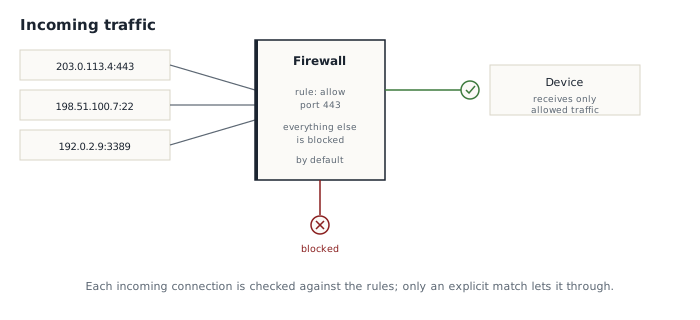
The closest image to how it actually works is access control at a building's entrance: every visitor is checked against a list of criteria, not searched in detail. A firewall doesn't read the content of the messages exchanged, unlike an antivirus, which inspects the files themselves (see the article on malware): it simply decides who's allowed to knock on the door.
Hardware firewall and software firewall
Two different firewalls generally protect the same device at once, at two separate levels. The router or home internet box's firewall filters traffic before it even reaches the local network: it's the first line of defense, protecting every device connected to the same Wi-Fi. The software firewall, built into the operating system (Windows Defender Firewall, or its macOS and Linux equivalent), additionally filters traffic specific to that one device, including between apps installed on it.
This double layer has real value: a device that joins an unsecured network, away from home, loses the protection of its usual router's firewall, but keeps its own software firewall active. That's one more reason, alongside encryption, why turning off a device's firewall is never harmless, even briefly, even just to test something.
How it actually decides
Most modern firewalls go further than a simple static list of rules: they use what's called stateful inspection. Rather than judging each data packet in isolation, the firewall remembers that an outgoing connection was started by the device itself, for example opening a website, and automatically allows the responses that come back as part of that same connection. A connection that arrives without having been requested beforehand, on the other hand, is treated as an outside attempt and evaluated against the general rules, almost always blocked by default unless something explicitly allows it.
This mechanism is what lets you browse the internet normally, constantly receiving data that wasn't originally solicited on its own (page content, images, videos) without any of these connections needing to be approved one by one: they're all responses to something the device itself requested.
What it doesn't protect against
- It doesn't protect against phishing, which relies on manipulating a person, not a network connection to filter (see the dedicated article)
- It doesn't protect against malware already present on the device if it communicates through an allowed connection, for example by disguising itself as normal web traffic
- It doesn't replace an antivirus, which inspects the content of files themselves rather than network traffic flow
- It doesn't protect data in transit against interception on an untrusted network, a role played instead by encryption or a VPN (see the dedicated article)
A properly configured firewall reduces the available attack surface; it doesn't make a device invulnerable to everything else.
The open-port trap
Some uses, like hosting a game server or remotely accessing a personal device, require deliberately opening a specific port in the firewall, an operation often called port forwarding at the router level. Opening a port literally means drilling a permanent hole through that first line of defense, for one specific service, pointing at one specific device on the local network.
The risk isn't theoretical: a service exposed this way becomes directly reachable from the outside, and therefore directly scannable by anyone on the internet, including automated tools constantly sweeping entire ranges of IP addresses looking for poorly secured open ports. An open port for a service that's never been updated, or protected by a weak password (see the article on passwords), turns a convenient little redirect into an exploitable entry point. The safest rule remains never opening a port without knowing precisely which service uses it, and closing it again as soon as it's no longer needed.
The firewall remains one of the oldest and quietest protections on a connected device: it almost never needs attention once properly configured, but every rule added or every port opened without thinking chips away at how effective it is.