Spotting a phishing email before it's too late
Listen to the audio version
Most account thefts don't start with a technical flaw. They start with a message that looks, almost perfectly, like one from a real company.
What phishing actually is
Phishing is a scam attempt that impersonates a well-known company or service: a bank, a delivery site, social media, sometimes even a coworker or relative. The goal is to push the victim into clicking a link, then typing a password or banking details into a site that perfectly mimics the real one, or opening a booby-trapped attachment.
It isn't a technical attack against a computer. It's manipulation aimed at the trust and quick reaction of the person receiving the message, a principle called social engineering. Attackers know a message received at a specific moment, in a specific state of mind (rushed, tired, distracted), has a far better chance of working than a calm, attentive read.
Not every form of phishing goes through email
The word phishing almost always brings email to mind, but the same technique exists today in several forms:
- Smishing, a blend of SMS and phishing, uses a text message instead of an email: a fake pending-package notice, a fake bank alert, often with a shortened link hiding the real destination.
- Vishing, for voice phishing, goes through a phone call. The person poses as a bank advisor, a tax agent, or tech support, and tries to get information directly by voice, sometimes creating fake urgency ("we detected a suspicious transaction on your account, confirm the code you received by SMS").
- Quishing uses a booby-trapped QR code, stuck for example on a fake parking meter or slipped into an email, redirecting to a fraudulent site once scanned with a phone.
- CEO fraud, or business email compromise, specifically targets companies: a message that looks like it comes from an executive urgently requests a wire transfer or the purchase of gift cards, leveraging hierarchy and urgency to prevent any verification.
What all these variants have in common stays the same: creating urgency or apparent authority to stop the victim from taking the time to check.
Most phishing attempts are sent in bulk, to thousands of recipients at once, knowing nothing about the specific victim. A more dangerous form, spear phishing, works differently: the attacker gathers real information about their target, often through social media or an earlier data breach, like their manager's name, a recent purchase, or the name of a current project at work. The message then becomes far more convincing, since it contains exact details a generic message wouldn't have. This is the technique generally used in the CEO fraud mentioned above: the attacker studied the company's org chart before writing anything.
The anatomy of a phishing email
A well-made phishing email can be visually identical to a real message from the company it impersonates, logo included. The signals worth spotting live elsewhere: the sender's address, where the links actually go, and the message's tone.
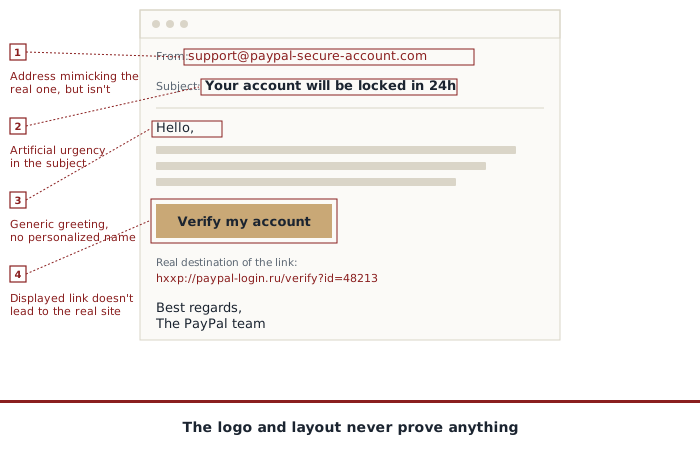
The most telling detail is often the sender's full email address, not just the displayed name. Most mail clients show a name (for example "PayPal Support") that the sender can set to anything they like, with no connection to the real address behind it. Always check the full address, not the displayed name.
The link in the message deserves the same scrutiny. An address like "paypal-account-security.com" has nothing to do with paypal.com, even though the word "paypal" appears in it. The real domain name is always the part directly before the extension (.com, .net...) reading from the right: in "login.paypal.fake-domain.com," the real domain is "fake-domain.com," not "paypal.com," even though "paypal" visually appears in the middle.
One common belief is worth correcting here: a padlock in the address bar, or an address starting with "https://," proves absolutely nothing about a site's legitimacy. That padlock only shows that the connection between the browser and the site is encrypted, not that the site genuinely belongs to the company it claims to be. Getting this encryption today is free and automated for anyone, including a phishing site created the day before. The padlock protects data in transit, it says nothing about the identity of whoever receives it on the other end.
The simple reflex that protects against almost everything
Never click the link in a message of this kind, whatever the channel (email, SMS, social media). Instead, open a new tab and type the site's address yourself, or use an already-saved bookmark. If the message is genuine, the information it mentions (a package, an invoice, an alert) will also show up by logging in directly to the site.
Before clicking any link, get into the habit of hovering over it with the mouse (without clicking) to see the real address shown at the bottom of the screen, and of checking the sender's full email address. On a phone, a long press on the link usually shows the same information without opening it.
For a suspicious phone call, the equivalent reflex is to hang up and call back the organization's official number yourself, found independently (official site, bank card, invoice), rather than trusting the number that called or the one given during the call.
What to do if you've already clicked
If information was entered on a fake site, the priority is to act fast. Immediately change the password involved, on that site and on any other where it might have been reused (see the article on passwords to understand why this point matters especially). Turn on two-factor authentication if you haven't already, and watch the account's recent activity for unusual logins or actions.
If banking details were given away, contact the bank directly through its official number to freeze the card, without waiting. Most banks have a dedicated emergency procedure for this kind of situation, available even outside normal hours.
Finally, report the message as a phishing attempt rather than simply deleting it: most mail providers and carriers offer a dedicated option, which helps block the same campaign for other recipients.
Phishing doesn't target its victim's technical skill, it targets how fast they react. Slowing down for a few seconds before clicking, or before responding to a pressing call, remains, even today, the most effective protection there is.