Two-factor authentication, how it actually works
Listen to the audio version
A stolen password is almost never enough anymore to get into an account protected by two-factor authentication. It's one of the most effective protections that exist today, and yet one of the least turned on, largely because its different forms are poorly understood.
The principle: three categories of proof, not just two steps
Two-factor authentication proves an identity by combining two elements of a different nature, generally chosen from three broad categories: something you know (a password), something you have (a phone, a physical key), or something you are (a fingerprint, a face). Combining two elements from the same category adds almost nothing: a password followed by a secret question is still two things you know, and therefore vulnerable to the same weakness. The real strength of two-factor authentication comes from the fact that stealing both categories at once is far harder than stealing just one.
The different forms, and what actually sets them apart
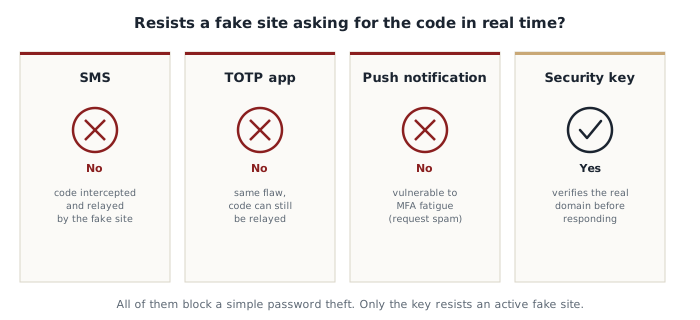
A code received by SMS remains the most common form because it requires no app to install. It does, however, have two real weaknesses. The first is SIM swapping: an attacker manages, often by manipulating the phone carrier's customer service, to transfer the victim's number onto their own SIM card, and then receives their codes instead of them. The second is less well known but more general: a well-made phishing site can ask for the password and then, right after, also ask for the code received by SMS, and relay both to the attacker in real time before they expire. SMS therefore protects against a stolen password on its own, but not against a well-executed phishing attack.
An authenticator app (like Google Authenticator or Authy) generates a code that changes every 30 seconds, calculated locally from a secret shared during initial setup, never traveling over a phone network. That's already safer than SMS, since there's nothing to intercept on a mobile network. But the same real-time phishing problem applies: a fake site can just as easily ask for this app-generated code and relay it to the attacker immediately.
Push notifications (an "Is this really you trying to log in?" alert sent directly to the phone) are convenient, but have given rise to a specific attack in recent years: MFA fatigue. The attacker, who already has the password, triggers dozens of login requests in a row, hoping the victim, annoyed or distracted, eventually taps "Approve" without thinking, just to make the notifications stop.
A physical security key (a small object plugged in over USB or tapped over NFC, using a standard called FIDO2 or WebAuthn, also the foundation of the "passkeys" increasingly on offer) is the only method genuinely resistant to real-time phishing. The reason is technical but important to understand: the key doesn't just generate a code for the user to type in; it cryptographically verifies that the site it's connecting to really is the genuine site, based on its exact domain name. On a fake phishing site, even one that's a perfect visual copy, that verification automatically fails, with the victim never needing to notice anything themselves.
Why it still blocks the vast majority of attacks
Even without a physical key, turning on two-factor authentication through an app or SMS neutralizes the overwhelming majority of fraudulent login attempts, including all those based on a data breach or a brute-force attack (see the article on passwords), which make up the vast majority of real-world cases. The real-time phishing risk described above does exist, but remains a more sophisticated attack, less common than simply testing a stolen password automatically.
Never turn on two-factor authentication without backup codes
When turning on two-factor authentication on an account, a set of backup codes (often around ten, single-use) is usually offered. These codes let you get back into the account if the phone is lost or broken. Without them, a lost phone can be enough to permanently lose access to an account. They should be written down and kept somewhere safe, separate from the phone itself, for example on paper or in a password manager.
Where to turn it on first
- Your email inbox, since it can often reset every other password
- Your password manager, if you have one
- Social media
- Bank accounts and online payment accounts
Setting up two-factor authentication rarely takes more than two minutes per account. The time lost in the event of a hack, on the other hand, is measured in hours, sometimes days. And even an imperfect form, like SMS, remains far better than having no two-factor authentication at all.