What an IP address actually is, and why it concerns you
Listen to the audio version
An IP address gets mentioned all the time, in an error message, a VPN ad, or a crime show, without being well understood. It's often surrounded by an exaggerated idea of what it can actually reveal about someone.
A mailing address for every connected device
An IP address is a string of numbers identifying a device, or more precisely a connection, on a network. It works a bit like a mailing address: it lets data sent by a site know where to come back to, all the way to the device that made the request. Without an IP address, a server would simply have no way of knowing where to send the requested web page back to.
IPv4 and IPv6, two formats for the same idea
The best-known form, like 192.168.1.1, is called IPv4, in use since the early days of the internet. The problem is that this format only allows for about 4.3 billion different addresses, a number that seemed enormous in the 1980s and is now nearly exhausted, with billions of connected devices worldwide. IPv6, a newer and much longer format (something like 2001:0db8:85a3:0000:0000:8a2e:0370:7334), was created to offer an astronomically larger pool of available addresses, comfortably enough to cover every connected device for a very long time. Both formats coexist today: most connections use them side by side without the user having to do a thing.
Why an entire house only has one public IP address
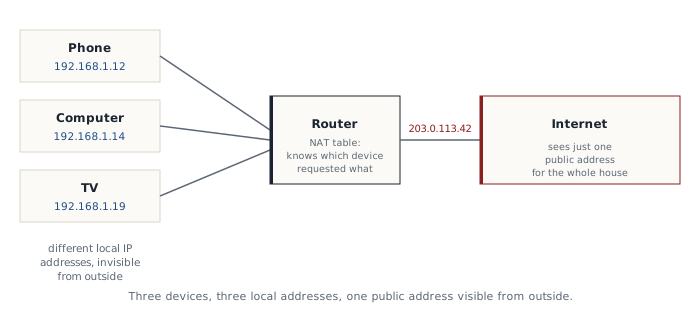
A home's internet router has a public IP address, visible from the internet, generally shared by every device connected to that router. Inside the home, each device (phone, computer, TV) also gets a local IP address, specific to the house's Wi-Fi network, invisible from the outside.
This sharing relies on a mechanism called NAT (network address translation): the router keeps a table matching every outgoing exchange to the exact device that requested it, letting it route all traffic through a single public address while always knowing which device to send each response back to. This mechanism is why a single home, with ten devices connected at once, only ever shows up as one address to the sites it visits.
The other half of the address: the port
An IP address alone isn't enough to know which specific application on the recipient's end an exchange is meant for. The same machine often runs several services at once: a web server, an email service, an online game. That's the port's job: a number between 0 and 65535 attached to the IP address (for example 192.168.1.14:443), which tells the machine exactly which application to deliver the data to once it arrives. Some ports are reserved by convention: port 443 for a secure website, port 80 for an unsecured one, port 25 for sending email. It's this combination of IP address plus port, never the address alone, that fully identifies a communication on the internet.
What an IP address actually reveals
A public IP address allows for an estimate of approximate location, generally the city or region, based on information recorded by the internet service provider. It gives away neither a name, nor an exact address, nor the identity of the person behind the device, contrary to a fairly widespread belief. Only the internet service provider holds that exact correspondence, and in principle only discloses it within a specific legal framework, for example at the request of a judicial authority.
This location estimate is nothing mysterious: every block of IP addresses is officially registered with a regional body (for example AFRINIC for Africa), along with the country and sometimes the city tied to that block. Specialized services compile these public registries to infer an approximate geographic area, generally reliable at the city level, but never down to a precise address.
Why it's still sensitive
An IP address can nonetheless be used to block access based on a country, target advertising based on an approximate geographic area, or, in the case of repeated malicious behavior, get reported. It's also the piece of information a VPN masks (see the dedicated article) by swapping it for the VPN provider's server address instead of your own, exactly the mechanism detailed in that article.
Static or dynamic, a useful distinction
Most consumer connections get what's called a dynamic IP address, which changes regularly, sometimes every time the router restarts. A static IP address, which never changes, is mainly used for specific needs, like hosting a service that needs to stay reachable at the same point at all times.
Finding your own IP address
You can find out your own public IP address by simply searching "what is my IP address" in a search engine, which displays it directly based on the connection used to run the search. It's a good way to check, for instance, that a VPN is actually working: the address shown should match the VPN server's, not the one usually tied to your connection.
An IP address is, above all, a technical mechanism the internet needs to function, not the precise individual surveillance tool the general public often imagines it to be.