VPNs, what they're actually for (and what they aren't)
Listen to the audio version
The VPN is one of the most misunderstood security tools, largely because of how it's marketed. Here's what it actually does.
What a VPN actually does
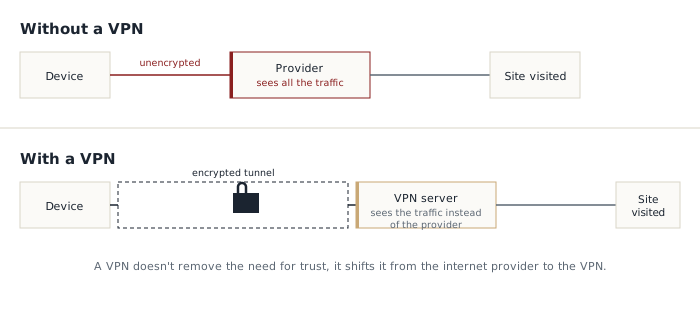
A VPN (virtual private network) creates an encrypted tunnel between a device and a server run by the VPN provider. All internet traffic goes through this tunnel before reaching its final destination, which hides the real IP address from the sites visited (see the article on IP addresses) and encrypts the data exchanged between the device and the VPN server.
The tunnel itself relies on an encryption protocol. Older VPNs often use OpenVPN, reliable but slower; most recent services now offer WireGuard, faster and simpler, which has become today's standard. You don't need to understand the protocol in detail to use a VPN properly, but WireGuard remains a good quality signal to look for in an app's settings.
What it actually protects
- It stops the internet service provider, or the public Wi-Fi network being used, from seeing which sites are visited
- It hides the real IP address, and therefore the approximate location, from the sites visited
- It's particularly useful on unsecured public Wi-Fi, in a café, an airport, or a hotel, where other people on the same network could intercept unencrypted traffic
- By switching servers, it allows access to content restricted to another region, a very common use even though it can go against some services' terms of use
What it doesn't protect, contrary to what the marketing suggests
- It doesn't protect against phishing, which relies on manipulation, not traffic interception (see the dedicated article)
- It doesn't protect against malware already installed on the device
- It doesn't make you anonymous if you stay logged into personal accounts (Google, social media) while using it: those services still know exactly who you are, whatever IP address is shown
- It doesn't replace a strong password or two-factor authentication
Free VPN: the deal that isn't one
Running servers all over the world costs money. When a VPN is entirely free with no visible trade-off, the business model usually sits elsewhere, and rarely in the user's interest. Some free VPNs resell browsing history to advertisers, exactly what a VPN is supposed to protect against. Others inject their own ads into visited pages, or simply route traffic without encrypting it properly. In the worst cases, a free VPN app has turned out to be malware itself, built solely to capture traffic to resell or exploit (see the article on malware).
A free VPN built into a well-known browser, or the limited free tier of an otherwise paid provider, remains reasonable. An unknown app promising unlimited, free access with no other visible source of revenue deserves genuine suspicion.
VPN and Tor, two different tools
VPN and Tor are often confused even though they rest on different principles. A VPN routes all traffic through a single server, the chosen provider's: protection depends entirely on the trust placed in that one company. Tor, by contrast, bounces the connection through several independent servers, run by volunteers spread across the world, so that no single server ever knows both the origin and the destination of the traffic. Tor offers more robust anonymity in principle, but at the cost of noticeably slower browsing, which makes it a tool for specific anonymity needs rather than everyday use like a VPN.
Something to watch for in choosing a provider
A VPN sees the entirety of the traffic that would otherwise pass through the regular internet provider. Using a VPN, then, means shifting trust from one party to another, not removing it. It's best to choose a provider with a clear no-logs policy, ideally verified by an independent audit rather than simply claimed on the provider's own site.
One technical feature is also worth looking for: the kill switch. It automatically cuts internet access if the VPN connection were to drop, preventing a silent disconnection from letting unprotected traffic slip through without the user noticing.
Another, more subtle technical trap is called a DNS leak. Before reaching a site, a device first has to translate its name (like example.com) into an IP address (see the dedicated article) through a service called DNS. A poorly configured VPN properly encrypts the main traffic, but sometimes lets these translation requests leave the tunnel in plain text, straight to the regular internet provider. The result is misleading: the displayed IP address looks like the VPN's, while the internet provider still sees the list of sites visited. A serious VPN offers its own DNS service inside the tunnel to avoid this problem, and many sites let you test for free whether a DNS leak is present once the VPN is turned on.
A VPN is a good tool for one specific use: protecting your connection on a network you don't trust. It's neither a universal protection nor a substitute for the basics covered in earlier articles, and a bad choice of provider can even do more harm than no VPN at all.