SimpleLogin, a different email address for every site, without ever revealing the real one
Listen to the audio version
Every breach covered on this site, from DentaQuest to Klue, has one thing in common: the email addresses of the people affected are almost always part of the stolen haul. A single address, used everywhere, then becomes a thread linking all of one person's accounts, and a ready-made target for phishing. SimpleLogin starts from a simple idea: never give out your real address again.
The principle: one alias per site
SimpleLogin creates aliases, email addresses with no inbox of their own: everything they receive is automatically forwarded to the user's real address, which stays unknown to the sender. You create a different alias for each site you sign up to, in one click from the browser extension or the app, with a random or chosen name.
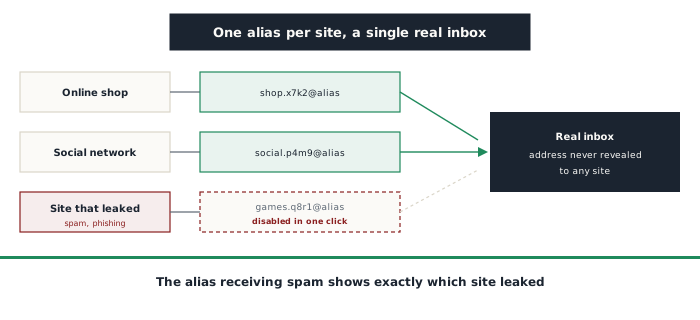
Replying is still possible: the reply goes back through SimpleLogin, which resends it from the alias, so the recipient never sees the real address, in either direction.
What it actually changes
The benefit isn't limited to hiding an address. Separate aliases change how you can respond to several very common situations:
- Knowing who leaked or sold the address: if the alias created solely for an online shop starts receiving spam, there's no doubt left about where it came from
- Cutting off a single address: a compromised or spam-flooded alias can be disabled in one click, without changing anything on other accounts
- Spotting phishing more easily: an email claiming to be from the bank, but arriving on the alias reserved for a gaming site, gives the scam away immediately (see the article on phishing)
- Breaking the link between accounts: an address stolen in a leak no longer lets anyone find the same person's other accounts, or mass-test the same login elsewhere, which is what the credential theft described in the article on passwords exploits
Who's behind it, and what it costs
SimpleLogin was acquired in 2022 by Proton, the Swiss company behind Proton Mail, and is now built into its password manager, Proton Pass. Its code is published as open source (see the article on open source), which makes it possible to check how it works and even to host it yourself. It works with any existing inbox, not just Proton Mail, and some managers like Bitwarden can generate a SimpleLogin alias right when creating an account.
At the time of writing, the free plan offers 10 aliases, the ability to reply from an alias, and a single destination inbox. The paid plan, around 36 dollars a year, unlocks unlimited aliases, using your own domain name, and PGP encryption of forwarded emails.
The detail that matters: the domain name
By default, aliases use a domain name owned by SimpleLogin. That creates a real dependency: if the service disappears, or you decide to leave it, those aliases stop working, and with them the ability to receive password reset emails for the accounts concerned. Using your own domain name removes that risk: the aliases stay under their owner's control, and can be pointed to another service whenever that's wanted. Some sites also refuse sign-ups from known alias domains, a problem that goes away with a personal domain.
What you have to accept in return
- SimpleLogin sees the emails it forwards: trust doesn't disappear, it shifts to this intermediary, unless PGP encryption to your inbox is turned on
- If the service is down, emails don't arrive, and a lost SimpleLogin account means losing access to every alias at once: it deserves solid two-factor authentication, ideally a passkey (see the article on passkeys)
- An alias doesn't protect what you give out elsewhere: a real name, a phone number, or a postal address link accounts together just as surely as an email address
- It doesn't filter email content: a phishing link arrives on an alias exactly as it would on a real address
Other services rely on the same principle, such as addy.io, also open source, Firefox Relay from Mozilla, or Apple's "Hide My Email" feature. SimpleLogin mainly stands out for its public code and the option of using your own domain. Whatever the tool, the underlying idea stays the same: an email address has no reason to be the same everywhere, and each site only needs to know the one created for it.