What a browser actually is, and what really happens when you type an address
Listen to the audio version
Typing an address into a browser and watching a page appear feels instant, almost magical. In reality, several clearly distinct steps happen in a fraction of a second, each with its own job.
The DNS step: translating a name into an address
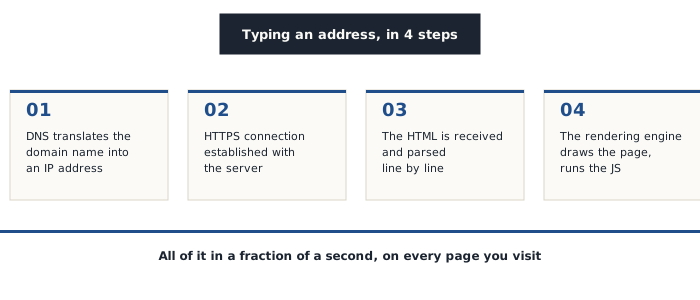
The first step is translating the typed name (like "blackcrypt.net") into an IP address (see the dedicated article), the only piece of information a network actually knows how to use to locate a server. This translation, called DNS resolution, works like a distributed directory looked up every time a new address is typed.
Establishing the secure connection
Once the IP address is known, the browser establishes a connection with the server, over HTTPS on nearly all of the web today. This step is exactly the handshake described in the article on symmetric and asymmetric encryption: an initial exchange in asymmetric encryption sets up a shared key, which then hands off to faster symmetric encryption for the rest of the exchange.
HTML, the page's skeleton
The server then sends back an HTML document, structured text describing the page's content (headings, paragraphs, images, links) without directly saying what it should look like visually. The browser starts parsing this document as it arrives, line by line, rather than waiting for the whole thing to download.
The rendering engine, what actually draws the page
A component called the rendering engine then takes over: it applies the style sheets (CSS) that define appearance, runs the JavaScript code that handles interactions, and literally draws every pixel shown on screen. Each major browser uses its own engine (Blink for Chrome and most browsers built on it, Gecko for Firefox, WebKit for Safari), which is why the same page can occasionally look very slightly different depending on the browser used.
Why the browser is also the most exposed entry point
The browser constantly handles content coming from external sources that are untrustworthy by nature (pages, scripts, files), which has historically made it one of the most sought-after targets for a security flaw (see the article on updates to understand why keeping it up to date matters especially for this particular piece of software, more than for a lot of others).
Extensions, convenient but broad access
A browser extension often gets broad access to the content of visited pages just to work properly, sometimes well beyond what its stated purpose would actually require. This same logic of trust handed to a third party, already seen with third-party apps connected to an account (see the article on social media), applies directly here: an extension installed and then forgotten remains an active access point, worth reviewing every so often rather than left unquestioned indefinitely.
Understanding these few steps demystifies a tool used dozens of times a day without ever thinking about it, and helps pinpoint where the things actually worth watching for really are.