Cookies and trackers, what a site actually knows about you when you visit it
Listen to the audio version
The "accept cookies" banner has become a reflex click, often with nobody really knowing what it's authorizing. Here's what a cookie actually does, and why they're not all the same.
What a cookie actually is
A cookie is a small text file, a few hundred characters at most, that a site asks the browser to keep and then send back on every following visit. It usually contains a unique identifier, a long string with no meaning of its own, which lets the site recognize a returning visitor instead of treating them as a stranger on every page load. A cookie is always tied to a specific domain: by default, a site can neither read nor modify cookies set by another domain.
This recognition is what makes perfectly useful things possible: staying logged into an account without retyping a password on every page, keeping a shopping cart filled while moving between pages, or remembering a language or theme preference (see the article on firewalls for another, equally misunderstood security mechanism). None of this needs to be hostile, and most cookies set on a site aren't.
Session cookies and persistent cookies
Two very different lifespans hide under the same name. A session cookie disappears automatically when the browser closes: it's typically the one keeping a login active during a visit, with no intention of remembering the visitor beyond that. A persistent cookie, on the other hand, carries an explicit expiration date, sometimes months or years in the future, and survives closing the browser as well as restarting the device. It's this second type that lets a site recognize a visitor weeks after their last visit, and it's also the one that makes extended tracking possible.
First-party and third-party, the real difference
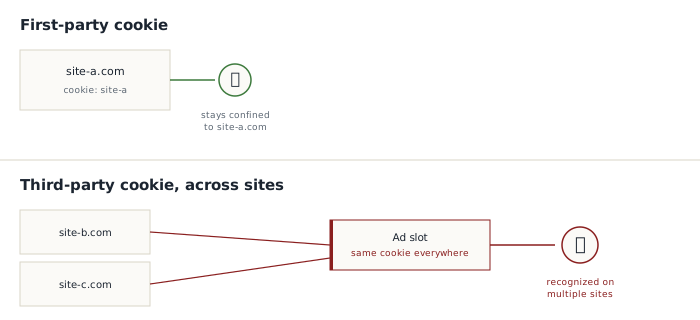
The distinction that matters most isn't lifespan, but where the cookie comes from. A third-party cookie comes from a resource embedded in the page but hosted by another domain, most often an ad slot or a social sharing button. If that same third-party element is embedded on thousands of different sites, it can set and read the same cookie on each of them, letting its operator piece together part of a person's browsing history across sites that otherwise have absolutely no connection to each other. It's this exact mechanism, not cookies as such, that worries privacy advocates the most, and it's the one most recent browsers (Safari, Firefox) now block by default, with Chrome having announced and then repeatedly delayed its own removal of third-party cookies.
What a cookie can't do
A cookie remains a passive text file, with no ability to execute anything: it can't read other files on the device, access the camera or microphone, or install anything at all. Those capabilities belong to malware, an entirely different category (see the article on malware). A cookie also can't, on its own, reveal a civil identity: it identifies a browser on a device, not a named person, unless that person has themselves logged into an account tied to their identity on that same browser.
Beyond cookies: fingerprinting
Blocking or deleting cookies doesn't put an end to every form of tracking. A more discreet technique, called fingerprinting, combines dozens of technical characteristics the browser shares anyway just to function properly: screen resolution, installed fonts, the exact browser and system version, time zone, the list of active extensions. Taken alone, each piece of information is mundane and shared by thousands of other visitors. Combined, they often form a fingerprint rare enough to identify one specific device among millions of others, with no need to store a single cookie.
This method is harder to block than a cookie, since it depends on no stored file that could simply be deleted: it's rebuilt on every visit from information the browser is required to send. Some recent browsers (Firefox, Brave) build in protections that deliberately standardize some of this information to make devices less distinguishable from one another, a different approach from simply blocking cookies.
Taking back control, in practice
- Decline non-essential cookies on the consent banner instead of accepting out of reflex, whenever a separate choice is offered, which it should be under applicable regulation
- Use browser settings to block third-party cookies by default, already done automatically on Safari and Firefox
- Periodically delete existing cookies from the browser's settings, which resets things to zero for sites with no other way to recognize you
- Keep in mind that private browsing prevents cookies from being kept locally after the window closes, but doesn't make you invisible: the site being visited, and the network being used, still see the visit as it happens
None of these measures eliminates tracking 100%, particularly against fingerprinting, but each one genuinely reduces how much information can be pieced together over time, which remains the best protection available without giving up normal internet use.