Bitwarden, the password manager that shows its own code
Listen to the audio version
The article on passwords recommended a password manager without naming a specific one. Bitwarden, free and open source, is a good illustration of what a serious manager has to prove technically, not just promise on a marketing page.
The zero-knowledge principle: what makes a manager trustworthy or not
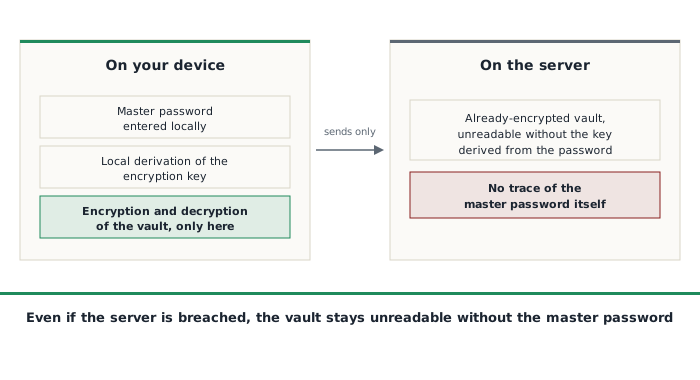
A zero-knowledge password manager works on a precise principle: the master password never leaves the user's device. It's only used, right there, to derive an encryption key through a mathematical function deliberately designed to be slow to recompute (which discourages any attempt to brute-force the password). It's this key, and only this key, that encrypts and decrypts the vault's contents locally. What then travels to the server is never the master password or the key itself, only the already-encrypted vault, a block of data unreadable without that same key.
The direct consequence: even if Bitwarden's servers were completely compromised, or even faced with a court order, the company itself technically has nothing readable to hand over, since it never holds the master password or the key derived from it. That's a fundamental difference from a service that would store passwords in plain text, or encrypt them with a key it holds itself.
Open source: the code is verifiable, not just promised
Most commercial password managers ask you to take their privacy policy on faith, with no way to check what the software actually does. Bitwarden publishes the entirety of its code, client and server alike, under an open-source license, letting any independent security researcher verify that the encryption really works as advertised, rather than simply believing a marketing page.
The company also has its infrastructure and code regularly audited by independent security firms, with reports made public, the same kind of verifiable transparency already seen in the article on Mullvad for VPNs.
What the LastPass breach showed about what can go wrong
A zero-knowledge architecture that looks solid on paper isn't enough on its own: its strength also depends on how it's actually implemented. LastPass, a direct Bitwarden competitor that also claims a zero-knowledge architecture, suffered an intrusion in 2022 in which customers' encrypted vaults were stolen from a cloud backup. The encryption itself wasn't broken, but some of the older vaults had been created with weaker key-derivation settings than today's standards, making them more vulnerable to an offline attempt at guessing the master password, with no limit on attempts or time, once the encrypted file was already in the attacker's hands. Cryptocurrency thefts were later attributed, by several independent investigations conducted in 2023, to vaults from that breach whose master password, too weak or too old, eventually gave way.
The lesson isn't only about LastPass: a zero-knowledge architecture only truly protects you if the master password is strong and the key-derivation settings stay current with today's standards. Technically correct encryption, applied to a weak master password or a vault never updated to sturdier settings, remains vulnerable despite the initial promise.
What Bitwarden actually offers
The free tier remains genuinely usable day to day, with no limit on the number of stored passwords or synced devices, a notable difference from several competitors that deliberately cap their free tier to push people toward a paid plan. The paid tier, at a modest yearly price, adds an advanced password generator, a security report flagging weak or reused passwords, monitoring for known data breaches affecting saved emails, and encrypted attachment storage inside the vault. Apps exist for browser, phone, and computer, with automatic sync across every device signed into the same account.
A lesser-known feature, emergency access, lets you designate a trusted contact who can request access to the vault after a configurable waiting period, if the account holder becomes unreachable, a concrete answer to the question of what happens in case of incapacity, without granting permanent, unsolicited access.
The self-hosting option, for those who want to go further
Since the server code is itself open source, it's possible to host your own Bitwarden server rather than trust the company's cloud service. A lighter, community reimplementation, Vaultwarden, has become the most widely used option for this kind of self-hosting, compatible with the official Bitwarden apps while demanding far fewer resources than a full official server. This option follows the same logic already applied elsewhere on this site for analytics (see the article on cookies and trackers): keeping full control instead of shifting trust onto a third party, even a reputedly serious one.
Things to keep in mind
- Bitwarden Inc. is a US company, subject to US law and any court orders that may come with it. The zero-knowledge architecture sharply limits the impact of such an order, since the company would technically only have already-encrypted data to hand over, but it's not the same geopolitical situation as a provider based elsewhere
- The master password remains, by design, the sole point of access: without it, and without emergency access configured beforehand, no one, not even Bitwarden, can restore a lost vault
- As with any security software, the promise is only as good as its default settings and how well it's kept up to date over time: the LastPass episode is a direct reminder of that
Who it's for
Bitwarden is for anyone who doesn't yet have a password manager, or is still using a single password reused everywhere (see the dedicated article to understand why that's risky). The free tier is more than enough to get started, the open code and public audits let you verify the promise instead of taking it on faith, and the self-hosting option remains available for anyone who wants to push that trust one notch further, later on.