What Wi-Fi actually is, and why it sometimes drops
Listen to the audio version
Wi-Fi is one of those technologies used constantly with nobody ever wondering how it works, until the day it stops working.
The basic principle
Wi-Fi lets devices (phone, computer, smart TV) talk to a router with no cable, using radio waves, a bit like FM radio but on a different frequency. The router itself stays connected to the internet through a real cable, usually fiber or a phone line, and assigns each device its own local IP address (see the article on IP addresses to understand this mechanism). Wi-Fi, then, doesn't provide the internet on its own: it simply forms the wireless link between the device and the router, which is the part actually connected to the rest of the world.
Why the signal weakens depending on location
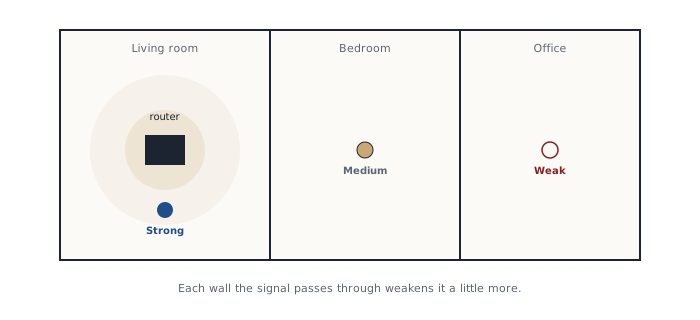
Wi-Fi waves lose strength passing through walls, and even more so through concrete, metal, or water (a fish tank, for instance, can genuinely interfere with a signal). The farther from the router, or the more obstacles between it and the device, the slower or more unstable the connection becomes. This is the most common reason for a poorly covered room in a home.
Two frequencies, and several generations of Wi-Fi
There are two main Wi-Fi frequencies: 2.4 GHz, which reaches farther but is slower and more prone to interference, and 5 GHz, faster but less able to pass through walls. Most modern routers offer both at once, and automatically pick the best one for each device, but it's sometimes worth manually forcing 5 GHz near the router, or 2.4 GHz in a distant room.
Wi-Fi also evolves in generations, a bit like 4G gave way to 5G. The current most common standard, Wi-Fi 6, brings better performance when several devices are connected at once, increasingly common with connected devices (TV, light bulbs, speakers). A recent router usually displays this generation number directly in its specifications.
Why it drops even when the signal looks fine
- Too many devices connected at once on the same network, sharing the same available bandwidth
- Other nearby Wi-Fi networks using the same frequency, creating interference, common in apartment buildings. On 2.4 GHz, this problem runs deeper than it looks: out of the thirteen channels theoretically available, only channels 1, 6, and 11 don't overlap with each other. A router set to an in-between channel like 4 or 9 encroaches on its neighbors on both sides, needlessly multiplying interference. Most routers now pick this setting automatically, but manually forcing 1, 6, or 11 remains the best option when in doubt
- Electronic devices jamming the signal, like a microwave running
- A router that needs the occasional restart, exactly like a computer that eventually slows down after weeks without one
Placing the router well, and extending coverage if needed
A router placed at the center of the home, up high, away from thick walls and electronics, always covers better than one stuffed in a closed cabinet or shoved into a corner. For a large home or a multi-story house, a single access point rarely does the job: a mesh system (several small units spread through the home, coordinating to form one continuous network) covers far better today than a simple Wi-Fi extender, which just rebroadcasts an already-weakened signal.
Securing Wi-Fi, not just getting it to work
A Wi-Fi password deserves the same seriousness as an online account password (see the dedicated article): the default password printed on the router's label is often fine, but changing it to something personal is never pointless if the router might have been handled by someone else in the past.
The type of encryption a network uses also matters. WPA3, the most recent standard, fixes several known weaknesses in WPA2, still very common but gradually aging. Most recent routers let you choose or check this setting in their settings menu. A network still configured with WEP, an old standard now crackable in minutes, should be changed without delay.
Finally, turning on a guest network, a feature present on most current routers, gives visitors or connected devices internet access without giving them access to the rest of the home network, a useful separation since not every connected device deserves the same level of trust.
Understanding these few principles is already enough to fix most everyday Wi-Fi problems, and to close the most obvious doors a poorly configured network leaves open.