How a smartphone actually works, in brief
Listen to the audio version
A smartphone fits in one hand, but it actually brings together dozens of distinct components working together at all times. Here are the main ones, and what they actually do.
The processor, an entire computer on a single chip
On a regular computer, the processor, the graphics chip, and the network modem are separate components. On a smartphone, almost everything is combined onto a single chip called a SoC (system on a chip): processor, graphics chip, memory management, and sometimes even the 4G or 5G modem all sit in the same place. This deep integration is what lets a device this thin stay this powerful, at the cost of more concentrated heat to get rid of, which is why a phone will deliberately throttle its performance when it gets too hot, to protect itself.
RAM and storage, two different things
These two terms often get mixed up even though they refer to very different things. RAM temporarily holds already-open apps, so you can jump back into them instantly without fully reloading them. Storage, on the other hand, permanently holds photos, apps, and files, even once the phone is switched off. A phone with little RAM closes background apps more often; a phone with little storage simply can't save anything new at all.
The sensors that guess what the phone is doing
A smartphone contains several small sensors that let it react without being explicitly told what to do. The accelerometer detects movement and orientation, which lets the screen rotate automatically. The gyroscope refines that measurement for games or augmented reality, which are sensitive to more precise rotations. The proximity sensor turns off the screen as soon as the phone is brought up to the ear during a call, to avoid accidentally pressing the touchscreen.
The antennas, invisible but essential
A smartphone contains several separate antennas, each dedicated to a specific type of communication: the mobile network (4G, 5G) for calls and browsing outside Wi-Fi, Wi-Fi itself (see the dedicated article), Bluetooth for nearby earbuds or connected devices, GPS for location, and NFC, a very short-range antenna (a few centimeters) used for contactless payment or reading badges, which needs no pairing unlike Bluetooth. These antennas operate independently of each other, which is why GPS can still work even with no mobile network available.
The secure chip, a fortress inside the phone
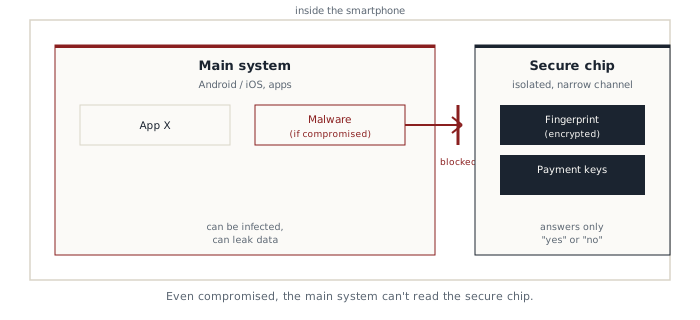
This is one of the least-known components, even though it protects the phone's most sensitive data. A fingerprint, facial recognition, and payment credentials aren't stored in the phone's main memory, the one running the system and apps, but in a separate, isolated chip, sometimes called a secure enclave or a secure element.
This isolation serves a specific purpose: even if the main system were compromised by malware (see the dedicated article), this separate chip stays unreachable from the outside, because it only talks to the rest of the phone through a very narrow channel, designed to answer only "yes" or "no" to a verification request, without ever revealing the biometric data itself. This is what lets you pay with your phone with full confidence, even on a device that's otherwise infected.
The operating system and permissions
The operating system (Android or iOS) runs each app in a space isolated from the others, a principle called sandboxing: an app normally can't read another app's data without explicit permission. This mechanism is why you get asked for permission before an app can access the camera, location, or contacts: without permission granted by the user, the app remains technically unable to access it, not just politely asked not to.
Granting a permission out of reflex, without asking whether the app actually needs it (a flashlight app asking for access to contacts, for instance), amounts to removing, on your own, a protection specifically designed to limit the damage from a malicious app.
The battery, the constraint that shapes everything else
A battery's limited capacity drives a large share of a smartphone's design choices: screen brightness, how much sustained power the processor is allowed, or how often apps are allowed to run in the background are constantly adjusted to save energy, often without the user ever noticing.
These components never work in isolation: it's their constant coordination, managed by the operating system, that makes the device feel simple to use, even though it's actually one of the most complex objects in everyday life.