VeraCrypt, encrypting a drive, and the hidden-volume option nobody can prove exists
Listen to the audio version
Encrypting a file or an entire drive protects its content if the device is lost or stolen. VeraCrypt, a free, open-source tool, goes one step beyond simple encryption: it can hide the very existence of part of the data, in a way no technical analysis can prove without the right password.
What VeraCrypt actually encrypts
VeraCrypt can encrypt in two different ways: creating a container file, which behaves like a virtual encrypted drive once opened with the right password, or directly encrypting a partition or an entire drive, operating system included. The content stays completely unreadable without the password, exactly like a digital safe that only opens with the right combination.
TrueCrypt's legacy, and why the audit matters
VeraCrypt was born in 2013 as a direct evolution of TrueCrypt, widely used encryption software whose developers abruptly stopped all activity in 2014, with a cryptic message claiming the software was "not secure," with no clear explanation ever given. This sudden, mysterious shutdown raised a lot of questions in the security community. An independent audit carried out shortly after by the Open Crypto Audit Project, crowdfunded for the occasion, found no backdoor or major flaw in the original code, reassuring on the technical principle's reliability while leaving the reason behind the original project's shutdown still poorly explained. VeraCrypt picked up that audited code and has evolved it since, with its own code also published as open source, the same independent-verifiability logic already seen with Bitwarden or Signal.
The hidden volume, plausible deniability
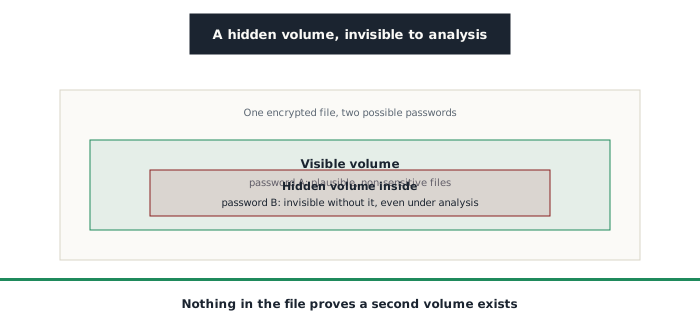
VeraCrypt's most unusual feature remains the hidden volume. A single encrypted file can hold two separate volumes, each opened by a different password: a visible volume, opened with the first password, containing plausible but not particularly important files, and a hidden volume, tucked into the visible one's free space, reachable only with a second, entirely different password. Since encrypted data statistically looks like random data, nothing in the visible volume's free space can prove a second, hidden volume actually exists there. Faced with someone forced to reveal a password, giving up the visible volume's stays credible without ever revealing the hidden volume's existence, a concept called plausible deniability.
A protection that demands discipline, not just a setting
This protection stays fragile if used carelessly. Modifying or adding files to the visible volume after creating the hidden one, without special precautions, risks overwriting part of the space where the hidden volume sits, or leaving indirect traces (modification dates, space used) that could raise suspicion under a thorough enough analysis. Turning on a hidden volume isn't enough by itself: it demands ongoing disciplined use for the protection to stay genuinely reliable over time, not just at the moment it's created.
Things to keep in mind
- Modern operating systems already offer built-in disk encryption (BitLocker on Windows, FileVault on macOS): VeraCrypt is nonetheless preferred by some precisely because its code is open and independently verifiable, unlike these proprietary solutions
- A forgotten password makes the data permanently inaccessible, with no recourse at all, not with VeraCrypt and not anywhere else
- The legal framework around being compelled to reveal an encryption password varies a lot from one country to another, worth knowing before relying on plausible deniability in a specific context
Who it's for
VeraCrypt is for anyone who wants to encrypt a drive or a sensitive file with a tool whose code has been independently audited, rather than trusting a closed proprietary solution. The hidden volume remains an advanced feature, useful in specific contexts where the very existence of a piece of data needs to stay deniable, not a setting to turn on by default without fully understanding what it demands in practice.