uBlock Origin, the blocker that also protects against tracking, not just ads
Listen to the audio version
The article on cookies and trackers described the mechanisms a site uses to track a visit. uBlock Origin, a free, open-source extension, directly tackles a good share of these mechanisms, well beyond simple advertising.
Far more than an ad blocker
uBlock Origin relies on filter lists, maintained by independent communities and regularly updated, which track domains known to host advertising, but also third-party tracking scripts, domains associated with known malware, or elements that needlessly slow down a page's loading. Every network request a visited page makes is checked against these lists before being allowed or blocked.
Open source, with no hidden monetization
Developed by Raymond Hill and published as open source, uBlock Origin explicitly sets itself apart from some of its competitors on one specific point: it offers no paid "acceptable ads" program, a business model where some ad blockers let certain ads deemed less intrusive through, in exchange for the advertiser paying. uBlock Origin blocks by the same rules for everyone, with no commercial exception.
The real recent change: Manifest v3
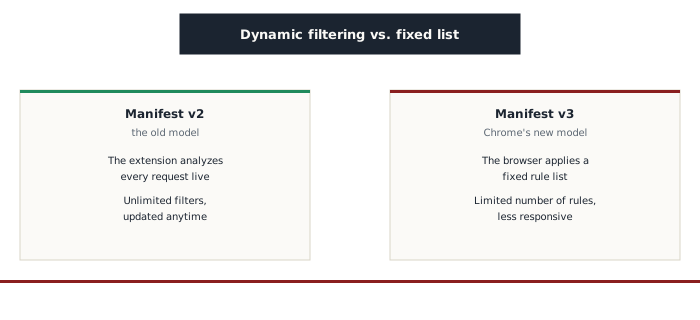
Chrome has changed how browser extensions are allowed to work, through a new system called Manifest v3. The old model let an extension analyze every network request live, with a practically unlimited number of filtering rules. The new model instead imposes a static rule list, capped in size, applied directly by the browser rather than by the extension itself in real time. This change concretely limits what a blocker like uBlock Origin can do on Chrome: the full version, built for the old model, can no longer run there with the same effectiveness, with a lighter version (uBlock Origin Lite) existing as a partial replacement. Firefox hasn't imposed the same restriction: the full version of uBlock Origin keeps running there without this limitation.
What this actually means for choosing a browser
This detail ties directly back to what the article on browsers described: choosing a browser isn't just about looks or speed, it also directly determines how effective the protection tools you can install on it actually are. The same ad-and-tracker blocker no longer offers quite the same guarantees depending on which browser it runs on, a direct consequence of decisions made at the platform level itself, not by the extension.
Who it's for
uBlock Origin suits anyone who wants to effectively block ads and trackers without depending on a business deal between the blocker's maker and advertisers. To get its fullest, most responsive version, installing it on Firefox remains, as of now, the most effective option against Chrome's new restrictions.